The U.S. Department of Commerce requires that all exportable GPS products contain performance limitations so that they cannot be used in a manner that could threaten the security of the United States. The following limitations are implemented on the Trimble Copernicus receiver receiver.
Immediate access to satellite measurements and navigation results is disabled when the receiver’s velocity is computed to be greater than 1000 knots, or its altitude is computed to be above 18,000 meters. The receiver continuously resets until the COCOM situation is cleared.
If the Raveon GPS transponder will be used in aviation applications, the unit should be put into the AIR mode. See the posting “gps-receiver-dynamics” for information about the AIR, LAND< and SEA modes.
Many different types of batteries may be used with Raveon’s M7 series of GPS transponders. This Technical Brief describes how well some common battery types will work with the M7 radios.
Actual battery life will vary based upon how often the M7 GPS transponder transmits, but the data in this Technical Brief may be used to predict the battery life of most configurations.
Test Setup
For the tests in this brief, a UHF GPS transponder, model RV-M7-UC-GX was configured in GPS mode 2 to transmit its position every 10 seconds. In GPS mode 2, the radio’s receiver is on 100% of the time, and the current draw of the M7 was an average of 90mA. The peak current draw was 2.1 amps for 68mS each time the M7 transmitted its GPS position.
Summary Data
Brand
Type
Recharge-able
mAh
Life
(RX on)
Life
(RX off)
Duracell
Alkaline
NO
1600
18 hours
36
Energizer
Lithium
NO
2500
28 hours
56
Lenmar
NiMH
Yes
1500
17 hours
34
Duracell Alkaline
These batteries are the common Duracel batteries found at most department stores.
Test Result Summary
Initial Voltage: 12.57 volts
Voltage at ½ discharge: 10.2 volts
Usable life (hours) 18 hours
Voltage drop when transmitting 2.4V (1.1 ohm resistance)
Approximate mAh capacity 1600mAh
Discharge Curve
Transmit Transient
The plot below shows the dip in voltage as the transmitter turns on and off.
Summary
The Duracell is an OK battery to power the M7 transponder. But its high internal resistance will reduce the RF power output after the first few hours of operation. The DC to the radio should stay above 9V while transmitting for full power, above 8V for 3-4 watts.
Energizer Lithium
These batteries are the common Energizer Lithium batteries for cameras and digital electronics found at many department stores.
Test Result Summary
Initial Voltage: 12.1 volts (14V for a few moments)
Voltage at ½ discharge: 12.0 volts
Usable life (hours) 28 hours
Voltage drop when transmitting 3.5V (1.6 ohm resistance)
Approximate mAh capacity 2520mAh
Discharge Curve
Transmit Transient
The plot below shows the dip in voltage as the transmitter turns on and off.
Summary
Even though the internal resistance of the cell is higher than the alkaline, the Energizer Lithium is a good battery to power the M7 transponder. Its high internal resistance will not reduce the RF power output because its voltage is fundamentally fairly high. The DC to the radio should stay above 9V while transmitting for full power, above 8V for 3-4 watts, so the 3.5V dip means the radio will have full power at 12.5V, and 3-4 watts out at 11V DC at the battery pack.
Lenmar R2G NiMH pack, 2150mAh cells
These batteries are Nickel Metal Hydride rechargeable batteries. They were fully charged before the test.
Test Result Summary
Initial Voltage: 11.0 volts
Voltage at ½ discharge: 10.3volts
Usable life (hours) 17 hours
Voltage drop when transmitting 2.0V (.95 ohm resistance)
Approximate mAh capacity 1500mAh
Discharge Curve
Summary
These batteries should be a good power source for the M7 GX transponder.
The internal cell resistance is low, but the voltage is also low. The RF power output stayed at full power for most of the life of the battery, dropping to about 4 watts at the end of the battery life. The double dip at end of live was due to the fact the radio keep working down to 6 volts (albeit with almost no RF output because the RF PA is off), and the batteries keep putting our very low voltage for another couple hours.
The M7 transceiver has a 5-watt RF power output rating. In a typical application the units is in Standby or Receive mode most of the time. A small fraction of the time, it is transmitting. But when it transmits, the M7 begins heating up, dissapating about 8 watts of heat. This depends upon the RF power output setting and the DC input voltage.
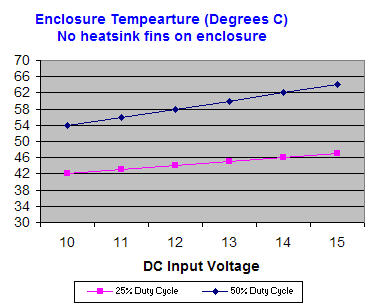
The temperature of the M7 enclusure must be kept below 60 degrees celcius, (140 farenheit) for proper operation of the unit. For GPS transponder operation, there is no problem doing this, because the duty cycle is low. But, if the M7 is used to send data, and is on the air a lare percentage of the time, then the enclusure’s temperature will begin to rise. The following chart shows the case temperature at 25% and 50% Duty cycle.
M7 Duty Cycle
You can see in the chart, that the M7’s enclosure temperature gets hotter if the DC input voltage is higher, or if the duty cycle is higher.
For example, if the DC input voltage is 10V, and the unit is operated at 25% transmit duty cycle, then the enclosure temperature would be about 42 degrees C. Given the same duty cycle, the enclosure temperature would be 46 degrees if the DC input were to be 14 volts.
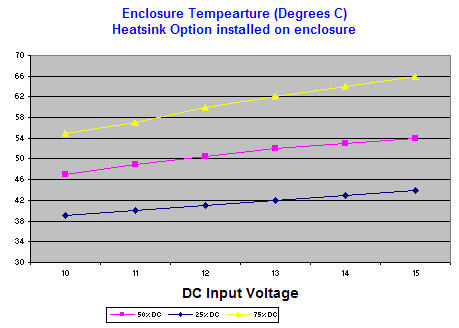
Raveon offers a heatsink option for the M7. The heatsink is large finned heatsink that covers the top of the M7, and is secured on with thermally-conductive epoxy. When this heatsink is attached, the M7 will stay cooler. The following chart illustrates this:
The above data is the M7’s enslosure temperature with a heatsink secured to it. The heatsink covers the top of the enclosure and uses normal air convection (no fan). It reduces the case temperature by about 4-8 degrees.
If a CPU cooling fan or similar fan were added instead, the case temperature rise would be only a few degrees above ambient.
Internal to Raveon’s M7 series of GPS transponders is a GPS receiver module made by Trimble. It is their Copernicus II GPS receiver module. Many of the M7’s performance specifications are driven by the use of this receiver module. The Copernicus II is ideally suited for vehicle tracking systems, AVL, asset tracking, and personal location. Details of the module are available on Trimble’s website at:
The following is a summery of the Copernicus GPS modules features and performance:
Overview
Trimble’s Copernicus® GPS receiver delivers proven performance and Trimble quality for a new generation of position-enabled products. It features the Trimble revolutionary TrimCore™ software technology for extremely fast startup times and high performance in foliage canopy and urban canyon environments. The Copernicus module is a complete 12-channel SBAS (which includes WAAS, EGNOS) capable GPS receiver in a thumbnail-sized module. Each module is manufactured and factory tested to Trimble’s highest quality standards.
Key Features:
2.54 mm T x 19 mm W x 19 mm L
94 mW typical continuous tracking
Supports SBAS (WAAS, EGNOS)
Active or passive antennas
NMEA, TSIP, TAIP protocols
RoHS-Compliant (Pb-free)
The sensitive Copernicus II GPS receiver can autonomously acquire GPS satellite signals and quickly generate reliable position fixes in extremely challenging environments and under poor signal conditions The unit also accepts aided GPS (A-GPS) data for faster startups in very weak conditions. The Copernicus II GPS module is a complete drop-in, ready-to-go receiver that provides position, velocity, and time data in a user’s choice of three protocols Trimble’s powerful TSIP protocol offers complete control over receiver operation and provides detailed satellite information.
On the front of the M7 series of transponders, is an Input / output (I/O) connector used to configure the unit. This I/O connector supports RS232 serial data (422 optionally), as well as digital input and output.
The RS232 9-pin serial I/O connector is a female 9-pin D-subminiature connector having the following pins configuration.It is pinned out so that it may be plugged directly into a computer or PC’s 9-pin COM port.
DB9 Female I/O connector
Front-view of DB-9 connector on modem (female)
Pin
Name
Dir
Function
Level / Specification
1
CD
out
Carrier detect
If enabled, indicates presence of carrier.Logical 0 (+ voltage on RS-232) means carrier is present.If disabled, it is asserted (0) whenever the modem is operational, and not in the configuration mode.It will be a 1 when the modem is in the configuration mode.
2
RxD
out
Receive data
Data out of the modem.
3
TxD
in
Transmit data
or
IN2
Data into the modem.
Also used as digital input IN2 for exception reporting. GND or floating for a 0, >3V for digital 1.If enabled for digital inputs, the serial data entering this pin is ignored (except in the command mode).Use the TRIGBITS command to set which bits are used as inputs.
4
DTR
in
Data terminal ready
or
IN0
Normally ignored by the RV-M7 modem. May control the power-state of the modem in low-power mode if this feature is enabled.
Also used as digital input IN0 for exception reporting. GND or floating for a 0, >3V for digital 1. Use the TRIGBITS command to set which bits are used as inputs.
5
GND
Ground connection
Signal and power ground
6
DSR
out
Data Set Ready
Normally is set to 0 when modem is powered on and running.Modem sets to a 1 when in low-power mode.
7
RTS
in
Request to send
or
IN1
Used to stop/start the flow of data coming out of the modem TxD pin.0 = OK to send, 1 = don’t send. Leave disconnected if not used.
Also used as digital input IN1 for exception reporting. GND or floating for a 0, >3V for digital 1.Use the TRIGBITS command to set which bits are used as inputs.
8
CTS
out
Clear to send
Used to stop the flow of data going into the RxD pin from the device connected to the RV-M7.0 = OK to send, 1 = don’t send.If the RV-M7 cannot accept more data, it will negate this signal (set to a 1).
9
Power
In/out
DC power (not ring signal)
User may supply the DC power to the modem on this pin.
Note:RS-232 signals use positive and negative voltages to represent digital 1s and 0s.A positive voltage is a 0, and a negative voltage is a digital 1.
This I/O pin-out allows the M7 to be directly plugged into a PC computer’s 9-pin serial port using a conventional 9-pin RS-232 serial cable.To connect it to a modem, or peripheral that has a serial port, you will need a “null-modem” cable.
Null Modem Cables
Sometimes, a “Null Modem” cable may be required to connect the M7 modem to another device.The specific connections are very dependent upon the type of hardware and handshaking used, but the following sections should help in configuring a null-modem cable.
How to use the handshaking lines in a null modem configuration? The simplest way is to don’t use them at all. In that situation, only the data lines and signal ground are cross connected in the null modem communication cable. All other pins have no connection. An example of such a null modem cable without handshaking can be seen in the figure below.
Simple Null-Modem Wiring Diagram
(Same wiring for male-to-male or female-to-femal cable)
Connector 1
Connector 2
Function
2
3
Rx
Tx
3
2
Tx
Rx
5
5
Signal ground
If you are connecting your M7 to a Lowrance or Garmin GPS display, then you will need a null-modem cable to connect the M7 to the display. Lowrance provides a serial cable for its GPSs with “pigtail” wires, so you can solder your own DB9 male connector to it, and plug the Lowrance directly into the M7.
To connect a Garmin GPS, use a null-modem cable to connect it to the M7, or the supplied Garmin serial cable and a “Null Modem Adaptor”.
Digital Inputs
The M7 GX Transponder has 3 digital inputs, called Trigger Bits.Trigger Bits are digital inputs that trigger the M7 GX to report its position and status.Normally these inputs are used for RS-232 signals, but they may be used for general-purpose digital inputs.The M7 GX may be configured to trigger a position/status report based upon the digital input bits state.
Important: If the digital input function is not needed, the TRIGBITS setting must be set to 0.This is the factory-default setting, and unexpected transmission may happen if the digital inputs are enabled and not used.
The status of all digital inputs is transmitted every time the unit reports its position. This is not dependent upon how the TRIGBITS paramter is set. Each transmission, all digital input status is sent.
Starting with firmware version C2 and higher, the digital inputs have “memory” if they are enabled with the TRIGBITS command. If you enable a bit or bits with the TRIGBITS command so that it triggers high, then the M7 will remember that a bit goes high if it does so, even momentarily. For example, if a TRIGBIT bit goes high and then quickly goes back low, the M7 will remember this, and the next time it reports its position, will report the bit as “High”, even if it is low. Subsequent position transmissions will report it low, until it goes high again. If a bit is not configured as a TRIGBIT, then the M7 will report the state of the bit at the moment the GPS position is transmitted.
If you are not using digital inputs to initiate a transmission, the TRIGBITS should be set to 0. (TRIGBITS 0 command)
If the RV-M7 GX was configured to transmit less-often when it is not moving, activation of the digital inputs will override this causing the unit to report at the interval programmed with the TXRATE command.The digital inputs may be configured to be active high, active low, or active on a change in state.The following table lists the available digital inputs on the standard RV-M7 GX:
RS-232 Pin
Function
4 – DTR
Input 0
7 – RTS
Input 1
3 – TXD
Input 2
5 – Ground
GND
There are 3 commands that must be configured to use the digital inputs:
TRIGBITS xThis command enables or disables individual bits for use as input triggers.
TRIGPOL xSets the polarity of the input.0=active high, 1=inverted, active low.
TRIGEX xSets which bits are used to report on exception. Exception reporting is when a position/status report is generated when an input changes either low-to-high or high-to-low.
The xx parameter is the hex binary representation of the bits.Refer to the following table to see the value for x.
IN 2 (TXD)
IN 1 (RTS)
IN 0 (DTR)
Hexadecimal Representation
0
0
0
0
0
0
1
1
0
1
0
2
0
1
1
3
1
0
0
4
1
0
1
5
1
1
0
6
1
1
1
7
For example, to enable bits 0 and 2 (DTR and TxD pins) to be used as digital input, issue the following commend:
TRIGBITS 5
If the bits are to be normally active high, then the polarity must be set to 0 (TRIGPOL 0 command).To set bit 0 so that it is inverted (active low), use the following command:
TRIGPOL 1
This will cause the unit to transmit when bit 0 (DTR pin) is low.
To enable exception reporting, that is transmit when a pin changes from low-to-high or high-to-low, use the TRIGEX command.When TRIGEX is 0, all inputs are active either high or low.When a bit is set to 1 in TRIGEX, then that bit will cause the unit to transmit position/status anytime it changes state.
For example, to configure the unit to transmit position when bit 0 changes state, issue these commands:
TRIGBITS 1(enables bit 0)
TRIGEX 1 (configures bit 0 for exception reporting)
To configure all bits to be used to report when they change, issue these commands:
TRIGBITS 7 (enables bit 0, 1 and 2)
TRIGEX 7 (configures bit 0, 1, and 2 for exception reporting)
To configure bit 0 to be used to report when it changes, bit 1 to cause a report when it goes low, and disable bit 2, use these commands.
TRIGBITS 3 (enables bit 0 and 1, disable 2)
TRIGEX 1 (configures bit 0 for exception reporting)
TRIGPOL 2 (configures bit 1 for active-low reporting)